How to Audit Your Website’s On-Page SEO in Seconds
Without Bloated Tools, Aggressive Tracking, or Arbitrary Scores
The “Draft & Forget” Trap
We’ve all been there. You get a burst of inspiration, draft half a blog post with around 200 or 300 words, and save it as a draft or hit publish with the intent to “finish it later.” Then, life happens. You move on to the next topic, create a new post, and completely forget about the old one.
We adventure back to those older posts rarely. As a result, over time, a growing blog becomes cluttered with thin content. This doesn’t just look incomplete to your readers—it actively drags down your overall website traffic and damages your domain’s search engine authority.
The Hidden SEO Gaps You Are Missing Right Now
When you are rushing to hit publish, it is incredibly easy to forget the basic building blocks of on-page optimization. Are you accidentally skipping these basics?
- Forgetting to upload a Featured Image
- Leaving the post body bare without supporting images
- 🔗 Missing crucial internal links to connect your topic silos
- Omitting authoritative external links
Why Big SEO Plugins Fail Content Creators
If you look at the most popular SEO plugins on the market today, they all try to solve this with arbitrary “SEO Scores” (like turning a red light green). They force you to over-optimize for a single focus keyword, add heavy tracking scripts to your WordPress backend, and bloat your database with features you will never use.
The Core Philosophy
“Writers don’t need a plugin to tell them how to write. They just need a tool to tell them what is missing.”
That is exactly why we designed Simple Content Quality Inspector. We stripped away the complex metrics, the grading algorithms, and the bloated code. Instead, we built a simple, lightweight utility that serves a single purpose: to identify the technical gaps and let the writer do what they do best.
Real-Time Auditing, Exposed on One Screen
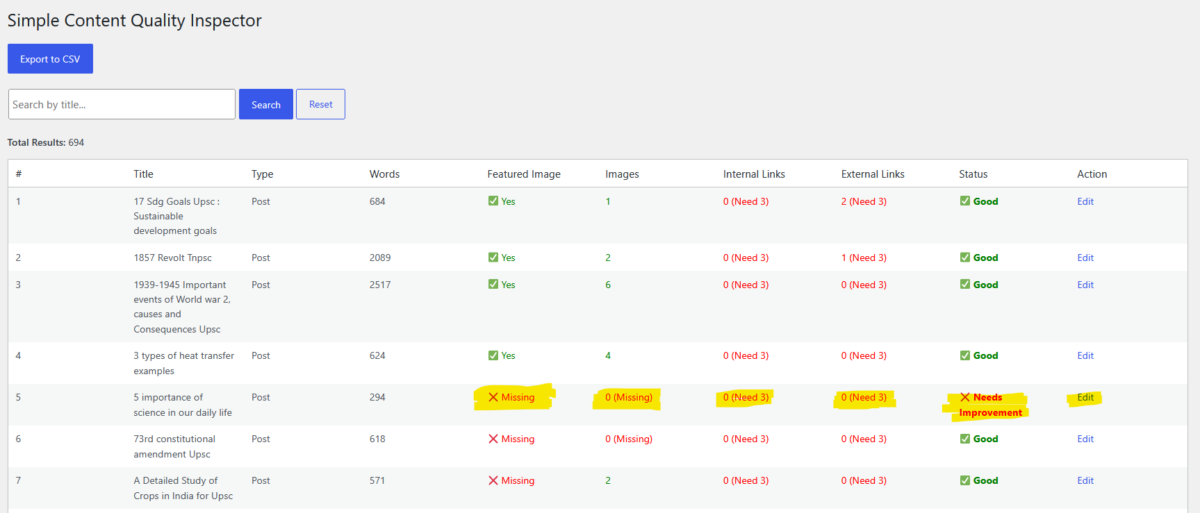
Instead of navigating back and forth through hundreds of individual post screens, Content Scanner aggregates your entire catalogue (even scanning massive sites instantly) into a single, beautifully organized table view.
| Feature Trigger | How It Protects Your Traffic |
|---|---|
| Word-Count Alerts | Filters out shortcodes and layout tags. If a post sits at a dangerous 294 or 102 words, it flashes a ❌ Needs Improvement status so you can instantly catch abandoned articles. |
| Media Checklist | Ensures your articles are visually rich. The “Featured Image” and “Images” columns run an automatic check. If you forgot a thumbnail, the system flags it as ❌ Missing. |
| 🔗 3-Link Benchmark | Internal and external linking is the lifeblood of SEO. Content Scanner implements an active “Need 3” rule. Even on 2,000-word articles, if it has zero connections, the plugin highlights the architecture gap. |
Stop Guessing, Start Optimizing
Content Scanner doesn’t make you change your workflow. It simply uncovers your forgotten mistakes so you can fix them systematically.
- Fast-Track Your Edits: Notice the Edit link on the far right of every single row? Click Edit to jump straight into the WordPress editor and complete the content immediately.
- Export Data Cleanly: Need a physical spreadsheet checklist? Tap the blue Export to CSV button at the top to download an unthrottled data report to share seamlessly with your writing team or SEO clients.